

Data Handling for Class 3: Pictographs and Bar Graphs With Examples
Data Handling for Class 3 is an essential maths topic that helps children make sense of information they see every day. This lesson on Data Handling teaches how to collect, organise and present simple data using hands-on examples so students learn to count, compare and interpret results confidently. Children will practise gathering information (like favourite fruits, number of books, or daily weather), recording it with tally marks and pictographs, and drawing basic bar charts to show differences clearly. This approach builds practical skills for answering questions from data, spotting patterns, and using information to solve everyday problems in the classroom and at home. In this guide you will learn how to collect data, represent it visually, read charts, and draw simple conclusions with confidence.
Table of Contents
- What Is Data Handling?
- What Is Data?
- How Is Data Represented?
- What Is a Pictograph?
- How to Read a Pictograph: Solved Examples
- What Is a Bar Graph?
- How to Read a Bar Graph: Solved Examples
- Frequently Asked Questions of Data Handling for Class 3

What Is Data Handling?
Imagine your teacher asks the whole class, “What is your favourite fruit?apple, banana, mango, or orange”. All 30 students shout out their answers at once. It will be complete chaos. But then your teacher writes it all down neatly in a table and draws a chart on the board. Suddenly, everyone can see that 12 students love mango and only 3 love orange.
That is exactly what data handling is.
Data handling is the process of collecting, organising, and representing information in a way that is easy to understand and use. Instead of a big jumble of numbers or words, you arrange the information so that patterns are visible and questions can be answered quickly.
Know more about related topics:
What Is Data?
Data is a collection of information. This information can be:
-
Numbers: like scores in a test, number of books read, or hours of study
-
Words: like names of fruits, modes of transport, or flavours of ice cream
-
Objects: like types of vehicles in a parking lot
For example, if Rohan counts the number of students who attended extra classes each day of the week, that list of numbers is called data.
How Is Data Represented?
Once you have collected data, you need to present it in a way that others can understand at a glance. Data can be shown using:
-
Tables: rows and columns of organised information
-
Charts: visual summaries of data
-
Graphs: diagrams like pictographs and bar graphs
A graph is a visual representation or diagram that shows data in an organised way. Two types of graphs are covered in Class 3:
-
Pictograph: uses pictures or symbols
-
Bar graph: uses bars or strips
What Is a Pictograph?
A pictograph is a type of graph that uses pictures or symbols to represent data.
Instead of writing numbers, you draw a certain number of pictures, like stars, apples, or smiley faces and each picture stands for a specific value.
Parts of a Pictograph
Every pictograph has three important parts:
1. Title: It tells you what the pictograph is about.
2. Labels: the categories being compared (e.g., Monday, Tuesday, etc.).
3. Key: The key (also called the legend) tells you the value of each symbol used in the pictograph.
For example, Rohan counts the number of students who attended extra classes each day of the week and made a pictograph of the number of students who attended the extra classes in a week.
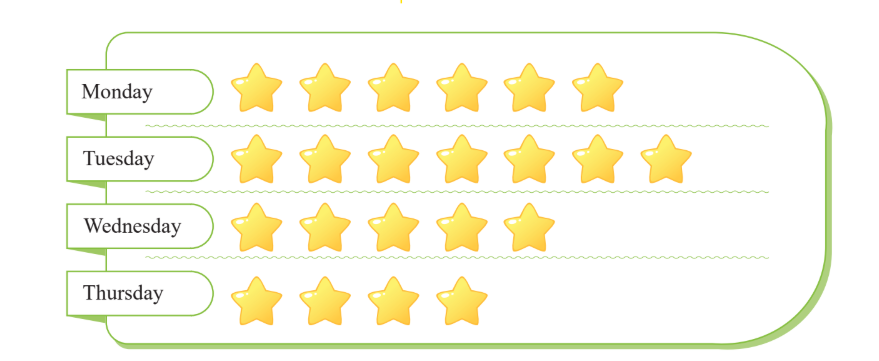
★ = 2 students, then:
3 stars = 3 × 2 = 6 students
5 stars = 5 × 2 = 10 students
7 stars = 7 × 2 = 14 students
How to Read a Pictograph: Solved Examples
Example 1: Madhav is a security guard at a parking lot. He records the number of vehicles parked on a holiday.
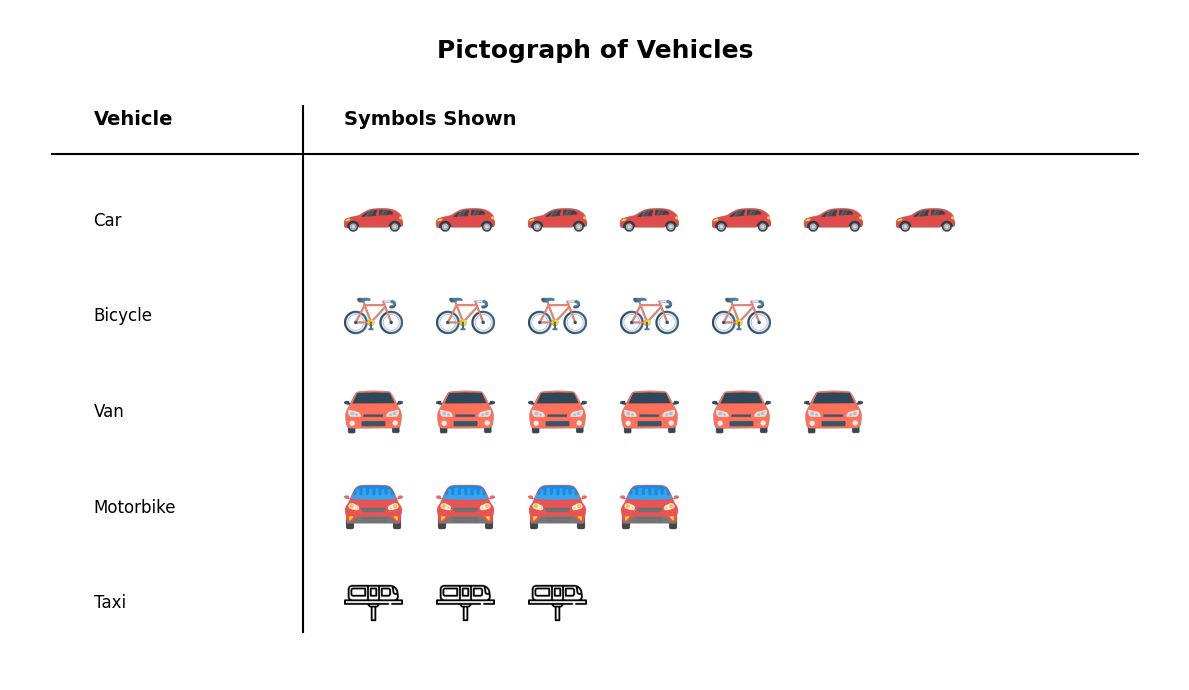
Key: 1 symbol = 4 vehicles
Questions and Answers:
a) Which vehicle is parked the least?
Taxi (only 3 symbols = 3 × 4 = 12 vehicles, the smallest count)
b) Which vehicle is parked the most?
Car (7 symbols = 7 × 4 = 28 vehicles, the largest count)
c) How many cars are parked?
Number of cars = 7 × 4 = 28 cars
d) How many more bicycles are parked than motorbikes?
Bicycles = 5 × 4 = 20
Motorbikes = 4 × 4 = 16
Difference = 20 − 16 = 4 more bicycles
e) How many vans and taxis are parked altogether?
Vans = 6 × 4 = 24
Taxis = 3 × 4 = 12
Total = 24 + 12 = 36 vehicles
What Is a Bar Graph?
A bar graph is a type of graph that uses bars or rectangular strips to represent and compare data.
Parts of a Bar Graph
1. Title: what the graph is about.
2. X-axis (horizontal line): shows the categories (e.g., food items, names of students).
3. Y-axis (vertical line): shows the numbers or values.
4. Bars: the coloured rectangles; the height of each bar shows the value for that category.
5. Scale: the unit of measurement on the Y-axis (e.g., each unit = 1, 2, 4, etc.)
Reading the Scale:
To find the value of a bar, look at where the top of the bar reaches on the Y-axis.
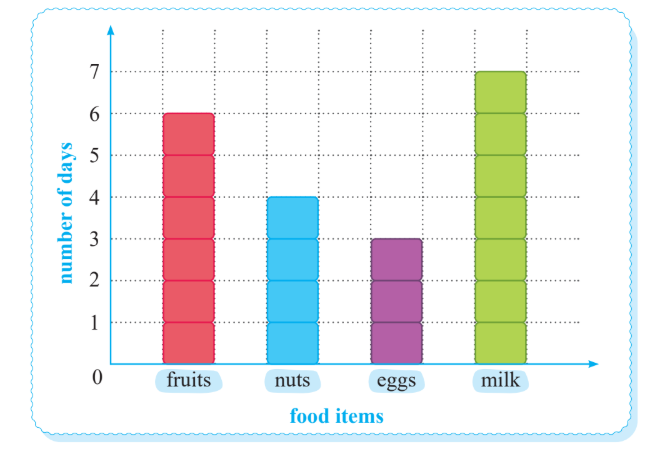
For example, Rohan visited a science exhibition with his grandfather. There, he saw various charts regarding healthy foods and lifestyles.
Rohan saw the following chart and tried to understand it.
-
The bar for fruits reaches up to 6: eat fruits 6 days a week
-
The bar for milk reaches up to 7: drink milk every day of the week
-
The bar for nuts reaches 4: eat nuts 4 days a week
-
The bar for eggs reaches 3: eat eggs 3 days a week
How to Read a Bar Graph: Solved Examples
Example 1:
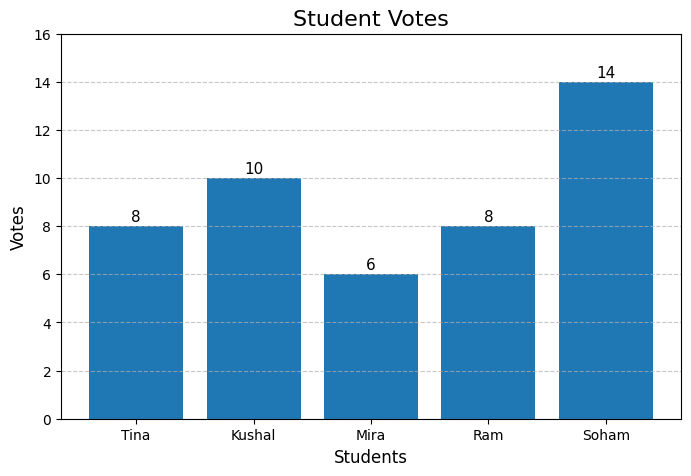
Five students: Tina, Kushal, Mira, Ram, and Soham, stood for class monitor. The bar graph shows the number of votes each received.
Questions and Answers:
a) Who received the least number of votes?
Mira, her bar is the shortest (6 votes).
b) Who got the maximum number of votes?
Soham, his bar is the tallest (14 votes).
c) Who received the same number of votes?
Tina and Ram, both bars reach 8.
d) How many more votes did Kushal get than Mira?
Kushal = 10, Mira = 6
Difference = 10 − 6 = 4 more votes
Here's a set of questions for practice. Solve them in a notebook with a proper layout.
Numbers make sense when they're taught right. To see how Orchids The International School turns Maths from intimidating to intuitive, reach out to our admissions team.
Frequently Asked Questions of Data Handling for Class 3
1. What is a pictograph for Class 3?
A pictograph is a type of graph that uses pictures or symbols to represent data. Each symbol has a value defined by the key.
2. What is the key in a pictograph?
The key tells you the value of each picture or symbol used in the pictograph. For example, if the key says 1 book symbol = 5 books, then you multiply the number of book symbols by 5 to find the actual count.
3. What is a bar graph for Class 3?
A bar graph is a chart that uses rectangular bars to represent and compare data. The taller the bar, the higher the value. It is used to compare items easily.
4. What is the difference between a pictograph and a bar graph?
A pictograph uses pictures to show data and always needs a key, while a bar graph uses bars and uses a numbered scale on the Y-axis. Pictographs are more visual and fun; bar graphs are more precise for comparing values.
5. How do you read a bar graph?
To read a bar graph, look at the label on the X-axis to identify the category, then trace the top of that bar across to the Y-axis to read its value.
Related Links


Admissions Open for 2026-27
What type of concept pages would you prefer?
CBSE Schools In Popular Cities
- CBSE Schools in Bangalore
- CBSE Schools in Mumbai
- CBSE Schools in Pune
- CBSE Schools in Hyderabad
- CBSE Schools in Chennai
- CBSE Schools in Gurgaon
- CBSE Schools in Kolkata
- CBSE Schools in Indore
- CBSE Schools in Sonipat
- CBSE Schools in Delhi
- CBSE Schools in Rohtak
- CBSE Schools in Bhopal
- CBSE Schools in Aurangabad
- CBSE Schools in Jabalpur
- CBSE Schools in Jaipur
- CBSE Schools in Jodhpur
- CBSE Schools in Nagpur
- CBSE Schools in Ahmednagar
- CBSE School In Tumkur











Orchids The International School is one of India's leading chains of CBSE and ICSE schools, with 110+ schools across the country.