

Introduction to Data Handling for Class 2 Maths
Data Handling for Class 2 introduces young learners to collecting, organising, and interpreting simple information using bright visuals, clear language, and hands‑on activities. This lesson helps children ask questions, sort and tally everyday objects (toys, fruits, colours), create basic pictographs and read results to answer simple questions such as “Which is most?” and “How many more?”. The guide includes engaging worksheet ideas to boost data vocabulary and early reasoning skills. Designed for short sessions and repeat practice, it builds foundational numeracy, observation skills, and confidence for further work on statistics.
Table of Contents
- Understanding Pictographs
- How to Read a Pictograph
- How to Make a Pictograph
- Solve Examples on Data Handling for Class 2
- Frequently Asked Questions of Data Handling for Class 2

Understanding Pictographs
A pictograph is the arrangement of data in a table using pictures or symbols. It makes data easy to read.
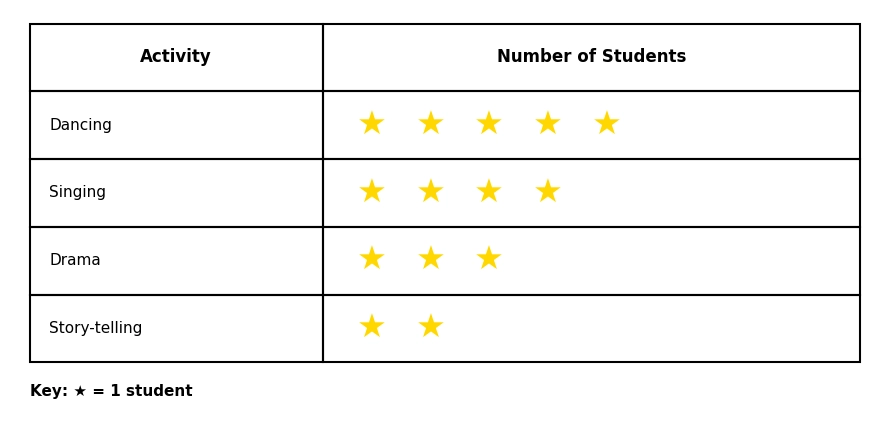
Instead of writing numbers, a pictograph uses a small picture or shape to represent a certain count. So instead of writing ‘5 students chose dancing,’ Rohan draws 5 stars in the row next to 'dancing'.
One star = one student.
What Is the Key of a Pictograph?
The shapes or pictures used to denote a number of objects in a pictograph are called the key of the pictograph.
The key tells you what each picture or symbol represents. In the example above:
Key: ★ = 1 student
So if you count 5 stars next to Dancing,you know 5 students chose dancing.
Know more about related topics:
How to Read a Pictograph
Follow these simple steps to read a pictograph:
Step 1: Read the title of the pictograph to understand what information it shows.
Step 2: Check the key: how many objects does each picture/symbol represent?
Step 3: Count the pictures in each row carefully.
Step 4: Multiply the count by the key value to get the actual number
Step 5: Use the data to answer questions: which is the most? which is the least? how many altogether? how many more?
How to Make a Pictograph
Here's the step-by-step guide to make a pictograph:
Step 1: Collect the data
For example, ask your classmates to vote for their favourite beverage: tea, coffee, lemon tea, or cold coffee. Tally the votes.
Step 2: Organise the data
List each category in a row.
Step 3: Choose a symbol or picture
You can use any shape: a star ★, a circle ●, a square ■, a triangle ▲. Pick something simple.
Step 4: Decide on the key
Like, key: symbol = 1 item.
Step 5: Draw the pictograph
For each category, draw the correct number of symbols in that row.
Step 6: Label everything
Add the title, the category names, and the key.
Solve Examples on Data Handling for Class 2
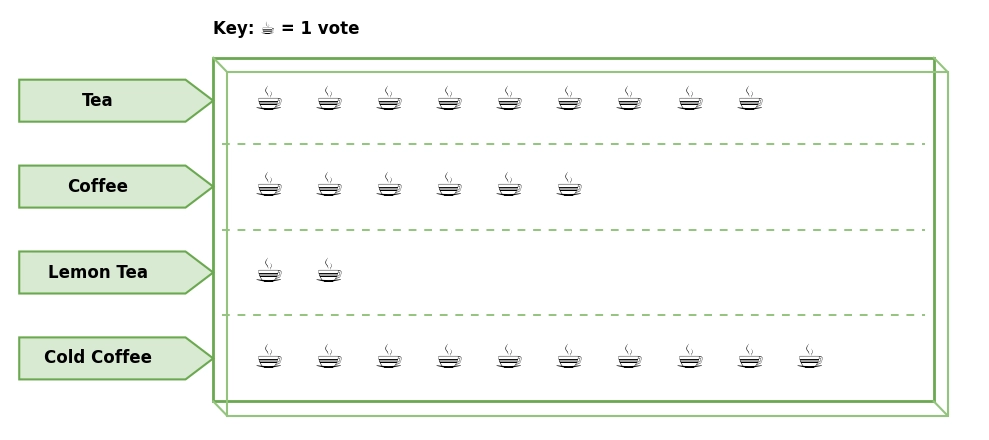
Example 1: Ravi asked his friends to vote for their favourite beverages. Here's what the data looked like:
Questions and answers:
1.Which is the most favourite beverage?
Cold coffee (10 votes)
2. Which beverage received the least number of votes?
Lemon tea (2 votes)
3. Which beverage received 6 votes?
Coffee
4. Total votes for tea and coffee?
Tea = 9
Coffee = 6
Tea and Coffee = 9 + 6 = 15
5. Which beverage received 1 vote less than cold coffee?
Tea (cold coffee got 10, tea got 9)
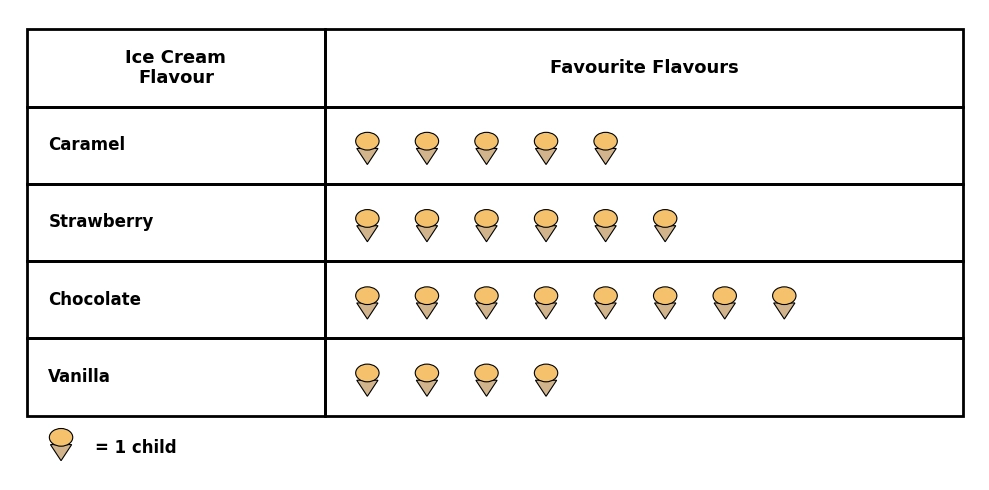
Example 2: The pictograph shows the different flavours of ice cream liked by the students of grade 2.
Based on the pictograph, answer the following questions.
a. How many students like chocolate ice cream?
8 students
b. How many students like caramel ice cream?
5 students
c. Which is the most liked flavour?
Chocolate
d. Which is the least liked flavour?
Vanilla
e. How many more students like chocolate ice cream than vanilla?
4 more students
f. Which ice-cream flavour is liked by 6 students?
Strawberry
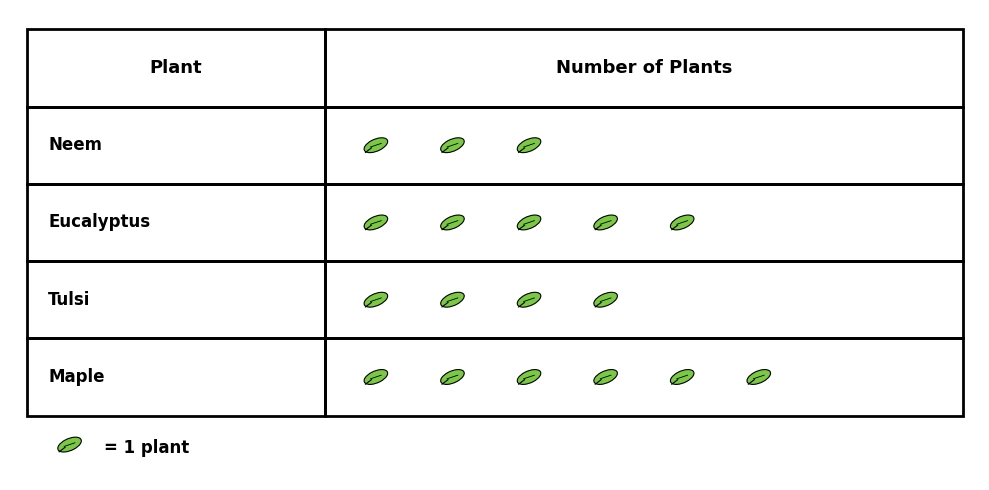
Example 3: For a project, Ravi collected different types leaves, which he represented using a pictograph.
Based on the pictograph, answer the following questions.
a. How many leaves did Ravi collect altogether?
18 leaves
b. Which leaves are the highest in number?
Maple leaves
c. Which leaves are the least in number?
Neem leaves
d. How many more tulsi leaves did he collect than neem leaves?
1 more leaf
e. How many maple leaves did Ravi collect?
6 leaves
f. Which leaf is 6 in number?
Maple leaves
Here's a set of questions for practice. Solve them in a notebook with a proper layout. Free download.
Numbers make sense when they're taught right. To see how Orchids The International School turns Maths from intimidating to intuitive, reach out to our admissions team.
Frequently Asked Questions of Data Handling for Class 2
1. What is the key of a pictograph?
The key of a pictograph tells you what each picture or symbol represents.
2. Why do we study data handling in Class 2?
Data handling builds several important skills in young learners like logical thinking, visual representation, comparison skills, arithmetic in context, chart reading etc.
3. How do you answer a 'how many more / fewer' question?
Always subtract the smaller number from the larger one. For example: Priya baked 7 caramel cookies and 6 chocolate cookies. How many fewer chocolate cookies were baked than caramel? 7 − 6 = 1 fewer chocolate cookie.
4. What is the difference between data and data handling?
Data is simply a collection of information. For example, a list of which activity each student chose is raw data. Data handling is what you do with that data: you sort it, organise it into groups, count each group, and present it in a useful form.
Related Links


Admissions Open for 2026-27
What type of concept pages would you prefer?
CBSE Schools In Popular Cities
- CBSE Schools in Bangalore
- CBSE Schools in Mumbai
- CBSE Schools in Pune
- CBSE Schools in Hyderabad
- CBSE Schools in Chennai
- CBSE Schools in Gurgaon
- CBSE Schools in Kolkata
- CBSE Schools in Indore
- CBSE Schools in Sonipat
- CBSE Schools in Delhi
- CBSE Schools in Rohtak
- CBSE Schools in Bhopal
- CBSE Schools in Aurangabad
- CBSE Schools in Jabalpur
- CBSE Schools in Jaipur
- CBSE Schools in Jodhpur
- CBSE Schools in Nagpur
- CBSE Schools in Ahmednagar
- CBSE School In Tumkur











Orchids The International School is one of India's leading chains of CBSE and ICSE schools, with 130+ schools across the country.